Access diagnostic demo · 1 min 27
An Access database health check on video, from the website to the full report
The video follows a diagnostic from start to finish: the website and the program, choosing the application, the analysis on a copy, a fault found with its cause and the proposed fix, the grade on your PC, the free summary, then the order, the payment, the key and the full report. The example is the Club omnisports de Saint-Aurèle, our demo application: a sports club run by its volunteers since 2016, 14 forms, 15 queries, 9 tables.
Narrated video, with subtitles burned into the picture: the sound only starts when you press play. The analysis is replayed at high speed (the example's took a little under 6 minutes), the payment is shown on the payment page in a test environment, and the full report is only partly shown. Synthetic voice: Chatterbox (Resemble AI, MIT), on the timbre of a Kokoro voice (Apache 2.0). Original sound design.
How it works
Your Access database checked in three stages, without leaving your desk
- 2 minutes
You start the program
One file to download, for Windows. Its first screen shows exactly what will be sent to our service to assess your risks, and what never leaves your computer. You confirm, then point to your application.
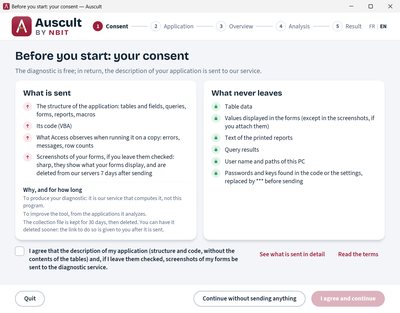
The first screen: what is sent, what never leaves, your consent - 5 min to 1 h
It tries everything, on a copy
Every form is opened, every report and query run, the buttons clicked one by one. Your original application is never modified, and you keep working meanwhile.
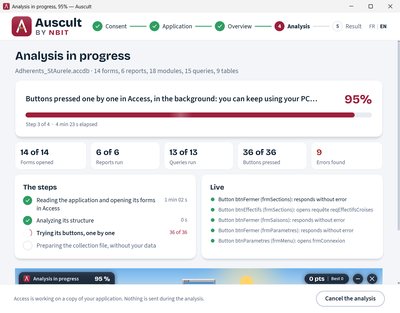
The live analysis: the counters move on, and you can cancel it - straight away
You read your grade
From A to E, with the number of errors and your risk exposure: that is the free summary. The full report opens with a key.
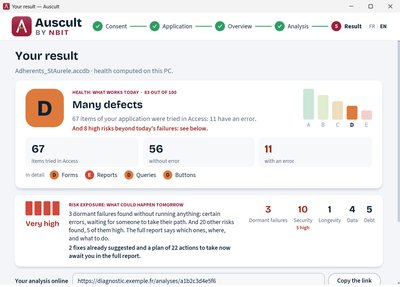
Your health grade, on your PC


The journey today
From the first click to the full report
You confirm what is sent
The first screen says what is sent to our service and what never leaves. You confirm, and the analysis begins.
You point it at your application
An
.accdbor.mdbfile, or an.accdrfront end with its data file. The program works out which is which.It analyses, on a copy
Every form is opened, every report and query run, the buttons clicked. You watch the counters live and can cancel at any time.
The health grade appears
From A to E, calculated on your PC, with the number of items tried and the number of errors.
The service returns your exposure
The collection goes to our service, which returns the exposure level and the number of risks per family. That is the free summary.
You order the full report
You choose a plan and pay by card; the report key is emailed to you.
You open the report
With the key, entered on your summary page: every fault and its fix, the risks, the map, the action plan, what a migration would take. The video shows only a passage of it.
Your turn
Run the diagnostic on your own application
The grade and the summary are free and commit you to nothing.